 RMM
RMMBefore a device can receive reboot commands from Reboot Manager, two things must be enabled inside RMMmax:
- The Client must be enabled for Reboot Manager
- The Agent must be enabled under that client
The guide below walks through both.
01
Open the RMMmax Portal
You must be logged in to access client and agent configuration.
- Sign in using your RMMmax administrator account
- Confirm you are on the Dashboard or Clients view
02
Select the Client You Want to Manage
Reboot Manager must be enabled at the client level before agents can use it.
Left navigation → Clients → choose the client
- Click the client name to open its configuration panel
- Verify you are on the Client Settings tab
03
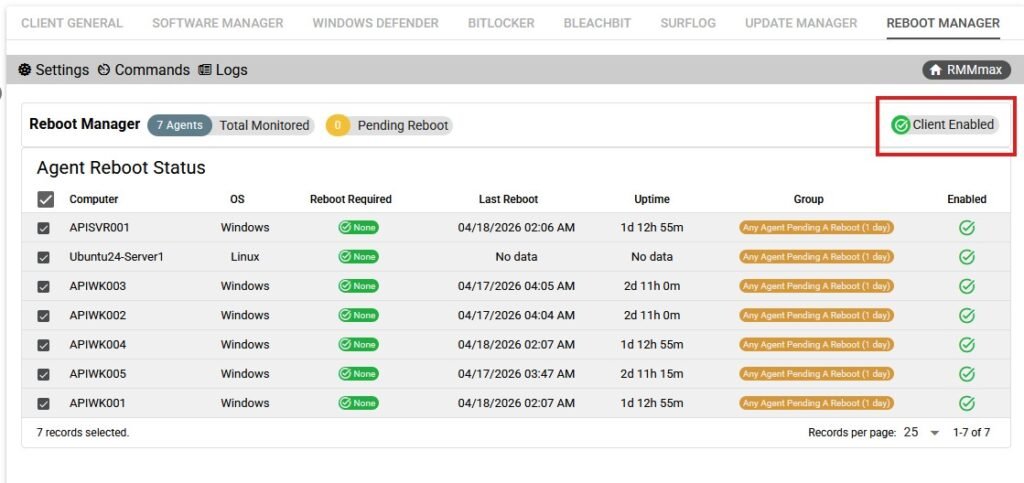
Enable Reboot Manager for the Client
Required
This allows all agents under the client to use Reboot Manager features.
- Locate the Reboot Manager toggle or module list
- Switch Enable Reboot Manager to ON
- Save changes to apply the setting
04
Open the Agent List for the Client
Each agent must be individually enabled to receive reboot commands.
Client view → Agents tab
- Review the list of agents reporting under this client
- Confirm the target device appears in the list
05
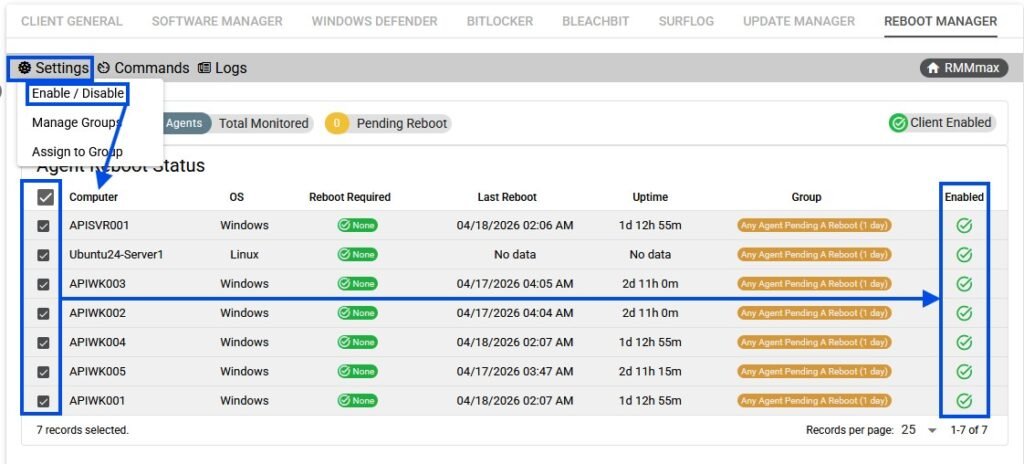
Enable Reboot Manager for the Agent
Most Common Step Missed
Agents do not inherit Reboot Manager access automatically; each must be enabled.
- Click the agent to open its details
- Find the Reboot Manager section
- Toggle Enable for this Agent to ON
- Save the agent settings
06
Verify Agent Status
Ensures the device is ready to receive reboot commands.
- Confirm the agent shows Online or recently checked in
- Confirm the Reboot Manager status indicator shows Enabled
- If the agent is offline, wait for the next check‑in or force a manual check‑in
Summary
Once both the Client and Agent are enabled for Reboot Manager, the device will immediately begin accepting reboot actions, scheduled reboots, and reboot‑related automation from within RMMmax.