 RMM
RMMHow the RMMmax Agent Service Operates
The RMMmax Agent Service is a lightweight Windows service designed to give RMMmax full device‑management capabilities with or without a third‑party RMM. Its operation is built around three pillars: secure authentication, deterministic command execution, and flexible enrollment behavior.
1. Check‑In Cycle
The agent runs on a predictable, efficient schedule:
- Every 5 minutes, the agent checks in with the RMMmax platform.
- During each check‑in, it requests any pending commands from the platform’s strict command layer.
- If no commands exist, the agent returns to its idle state until the next scheduled check‑in.
This ensures low overhead during idle periods while maintaining consistent visibility and heartbeat reporting.
2. Rapid Command Execution Loop
When commands do exist, the agent switches into a high‑responsiveness mode:
- The agent receives a command.
- Executes it immediately.
- Performs an instant follow‑up check‑in to see if more commands are waiting.
- Repeats this loop until the command queue is empty.
Only after all commands are processed does the agent return to the normal 5‑minute interval.
Result: You get near‑real‑time execution when work is pending, without constant polling or resource waste.
3. One‑Time Token Exchange Security
Every communication between the agent and RMMmax uses a single‑use, short‑lived token:
- Each successful authentication issues a new token.
- Tokens can be used only once.
- Tokens expire quickly and cannot be reused.
- Replay attacks are effectively impossible.
This creates a modern, zero‑trust‑style security model without storing long‑lived secrets on the endpoint.
4. Reliable Command Processing
The agent includes several internal mechanisms to ensure commands run consistently and return accurate results:
- Commands are written to temporary
.ps1files and executed with-ExecutionPolicy Bypass. - Fixes the silent grandchild‑process issue where stdout was empty.
- WOW64 path handling corrected using
SysNativefor 32‑bit processes on 64‑bit Windows. - Activity logs stored under
%ProgramData%\RMMMax\AgentService\with rotation and duplicate‑line suppression. lastContactupdated on every check‑in for accurate device status.- JSON command results stored as proper objects, not quoted strings.
These improvements make the agent predictable, debuggable, and stable across all supported Windows versions.
5. Enrollment & Client/Location Assignment
The agent supports two operational modes:
Standalone Mode (Team RMM API Type = None)
- The agent is the exclusive management layer.
- No external RMM is required.
- Ideal for companies without an RMM or for managing devices outside the RMM footprint.
Hybrid Mode (Any RMM API Type)
- The agent can run alongside any RMM (Datto, Automate, N‑central, Ninja, Syncro, etc.).
- On installation, the agent will:
- Join an existing Client and Location if they exist.
- Automatically create them if they do not.
This makes onboarding new customers or isolated devices effortless.
6. Unified Feature Set
Regardless of how a device connects—through a third‑party RMM API or through the Agent Service—it receives the same full RMMmax functionality:
- BitLocker automation
- Surflog
- Defender tools
- BleachBit
- Software modules
- Command execution
- Result reporting
This ensures consistent behavior across mixed environments.
7. Why This Architecture Matters
The Agent Service enables scenarios that traditional RMM‑only setups struggle with:
- Managing small batches of machines not enrolled in your RMM
- Supporting contractors, off‑domain systems, or isolated networks
- Providing full management capabilities to companies without an RMM
- Reducing dependency on third‑party RMM limitations or outages
- Ensuring consistent automation across all devices
In short: The Agent Service gives RMMmax the power of a full RMM agent, but with more flexibility, stronger security, and broader deployment options.
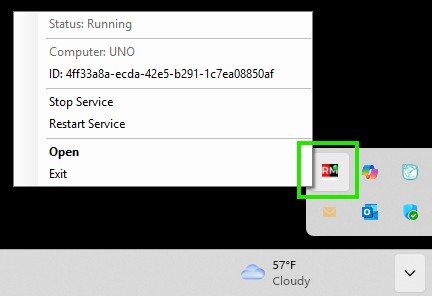
The RMMmax Agent Service can operate in the systray.
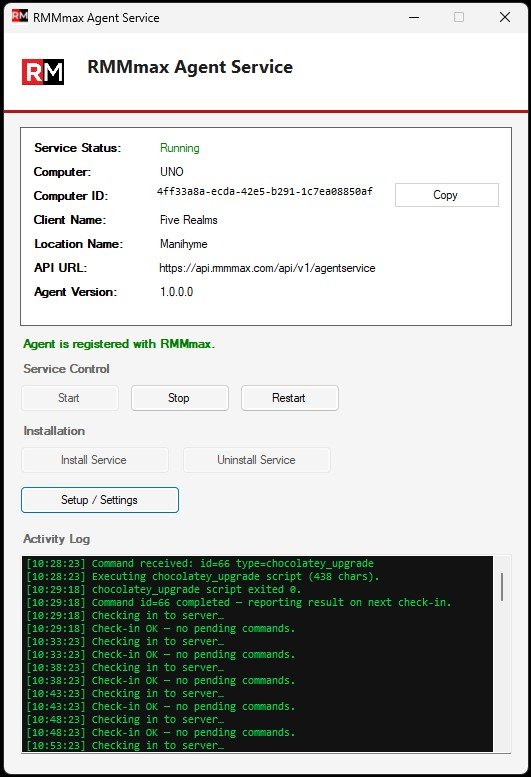
RMMmax Agent Service Console
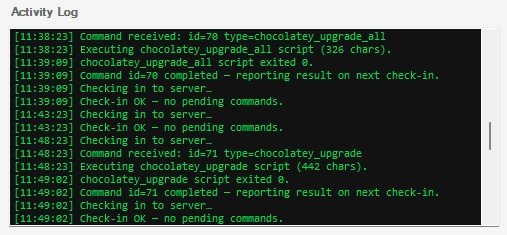
RMMMax Agent Service Activity Logs
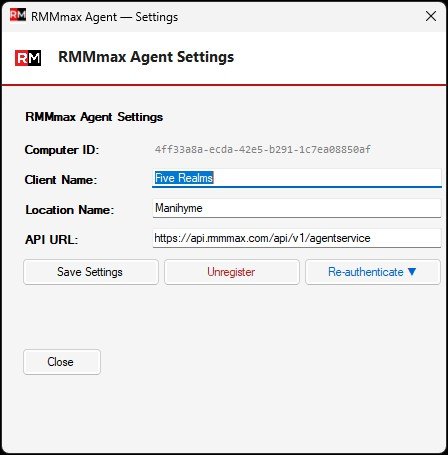
RMMmax Agent Service Setup