
Skip to content
  • News
  • Pricing
  • Compare
  • ToolBox
    • Chocolatey
    • SurfLog
    • Windows Defender
    • BitLocker
    • BleachBit Manager
    • Linux Updates
    • Homebrew
    • Update Manager
    • Reboot Manager
    • CVE Intelligence
  • Contact Us
  • News
  • Pricing
  • Compare
  • ToolBox
    • Chocolatey
    • SurfLog
    • Windows Defender
    • BitLocker
    • BleachBit Manager
    • Linux Updates
    • Homebrew
    • Update Manager
    • Reboot Manager
    • CVE Intelligence
  • Contact Us
Login

BitLocker

⌘K
  • Getting Started
    • Enable BitLocker Management for Clients and Agents
  • Client View
    • BitLocker Client Commands (Export Keys)
    • BitLocker Client Commands (Rescan Client)
    • BitLocker Client Settings (Enable / Disable)
    • BitLocker Client Settings (Settings)
    • BitLocker Client View
  • Agent View
    • BitLocker Agent View
    • BitLocker Agent Settings (Add Key Protector)
    • BitLocker Agent Commands (Scan Volumes)
    • BitLocker Agent Settings (Enable / Disable)
    • BitLocker Agent Volume Suspend and Lock
  • Troubleshooting
  1. Home
  2. BitLocker
  3. Client View
  4. BitLocker Client Settings (Settings)

BitLocker Client Settings (Settings)

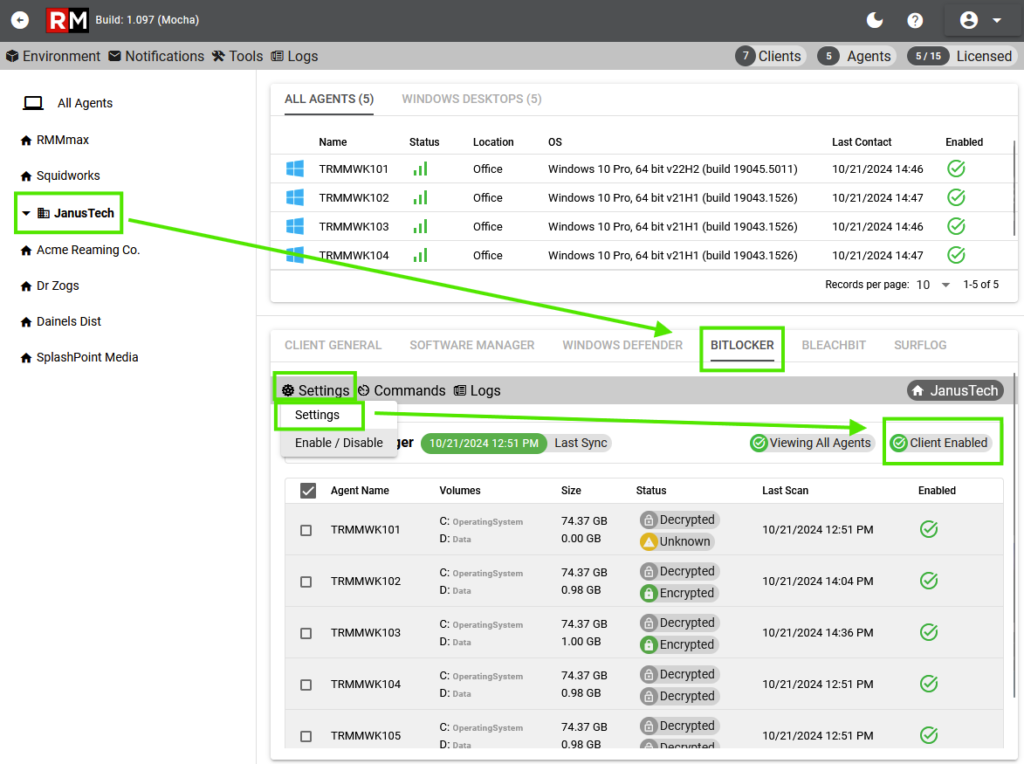
The client settings menu allows you to enable the client for BitLocker. The client must be enabled before any agents are able to be managed.
Doc navigation

← BitLocker Client ViewBitLocker Client Settings (Enable / Disable) →
Still stuck? How can we help?
Updated on October 21, 2024
Was this article helpful to you? No Yes

How can we help?

RMMmax

All rights reserved