
Skip to content
RMMmax
  • Tools
  • Automation
  • Platforms
  • Pricing
  • Latest
  • MCP
  • Tools
  • Automation
  • Platforms
  • Pricing
  • Latest
  • MCP
Start free

Windows Defender

⌘K
  • Getting Started
    • Enable Clients And Agents
  • Client View
    • Windows Defender Client View
    • Windows Defender Client Settings (Settings)
    • Windows Defender Client Settings (Exclusions)
    • Windows Defender Client Settings (Enable / Disable)
    • Windows Defender Client Commands (Full Scan)
    • Windows Defender Client Commands (Quick Scan)
    • Windows Defender Client Commands (Rescan Client)
  • Agent View
    • Windows Defender Agent View
    • Windows Defender Agent Settings (Preferences)
    • Windows Defender Agent Commands (Full Scan)
    • Windows Defender Agent Commands (Quick Scan)
    • Windows Defender Agent Commands (Rescan Agent)
    • Windows Defender Agent Settings (Enable / Disable)
    • Windows Defender Agent Settings (Exclusions)
  • Troubleshooting
  1. Home
  2. Windows Defender
  3. Agent View
  4. Windows Defender Agent Commands (Rescan Agent)

Windows Defender Agent Commands (Rescan Agent)

Windows Defender Rescan Agent Command

The Rescan Agent function sends a request to the RMM to have the agent update its current status of antivirus and antimalware.  This is not a virus scan but a current status scan.
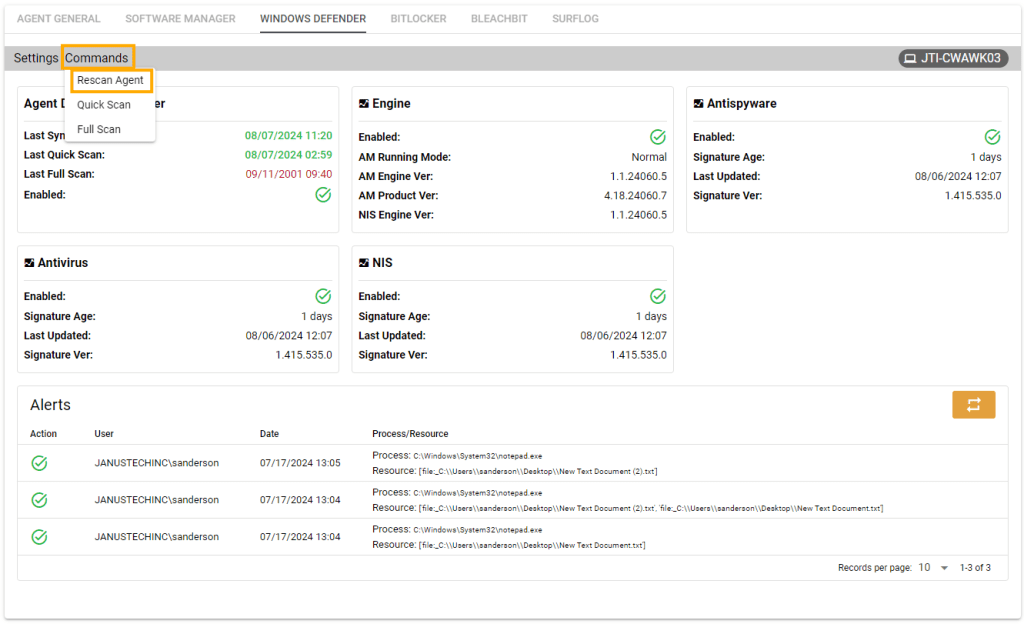
Windows Defender rescan agent commands

Doc navigation

← Windows Defender Agent Commands (Quick Scan)Windows Defender Agent Settings (Enable / Disable) →
Still stuck? How can we help?
Updated on October 22, 2024
Was this article helpful to you? No Yes

How can we help?

RMMmax

Remote monitoring, management and IT automation for Windows, Linux and macOS.

All rights reserved